13 Best Canva Brand Guidelines Templates for Professional Brand Identity
Canva Brand Guidelines templates can help organize the visual and strategic elements that define a brand, from typography and color choices to logo usage and presentation standards. The 13 options below include detailed style guides, minimalist presentations, creative layouts and specialized brand identity resources for businesses, marketers and content creators.
The selections prioritize direct relevance to brand guidelines design in Canva and the documented purpose of each template. The roundup highlights differences in page or slide count, visual direction, customization and intended use where those details are provided, helping you narrow the choices without assuming features that are not documented.
Why These Canva Brand Guidelines Templates Are Worth Considering
A useful brand-guidelines template needs more than an attractive cover. It should give your brand information a clear structure so that teammates, clients or partners can understand how the identity is intended to look and communicate. The supplied products range from detailed brand books with mission, visual identity and tone-of-voice sections to presentation templates built around concise visual storytelling.
There is also meaningful stylistic variety. Minimalist, fashion-oriented, playful pastel, warm-earth and magazine-inspired layouts appear alongside broader professional options. This makes the selection useful for readers searching for a brand guidelines template Canva workflow that fits both their content requirements and existing visual identity.
Best Canva Brand Guidelines Templates
1. Lune Skin – Brand Guidelines Template — Best for Complete Visual Brand Presentations
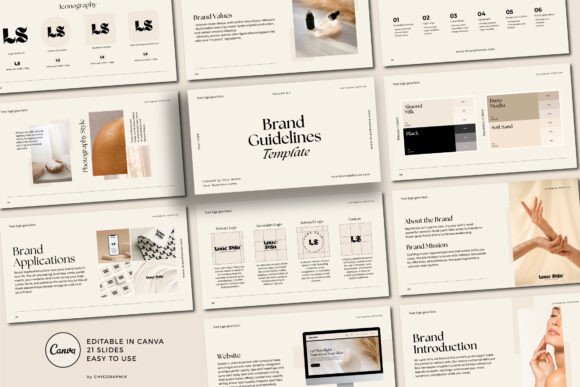
A modern, minimal 21-slide brand guide covering typography, iconography, business cards, color palettes and logo usage. Guidance text helps structure each section, while editable pages make it adaptable for client work, personal branding or business presentations.
- Includes 21 professionally designed slides.
- Covers typography, iconography, color palette and logo usage.
- Includes a business card layout.
- Original guidance text explains what to include in individual sections.
- Pages can be moved, duplicated or deleted.
- The listing states that it can be edited with a free Canva account.
Consider: Its modern minimalist direction is particularly relevant to brands that want a restrained presentation rather than a highly decorative style guide.
2. Branding Guideline Template | Brand Book — Best for Detailed Brand Style Guides
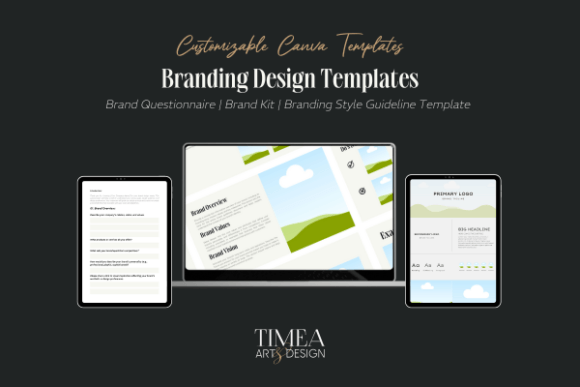
A professional brand style guide template structured around core identity topics. Its documented sections cover brand mission, visual identity, tone of voice and usage guidelines, giving businesses a practical framework for organizing brand standards.
- Designed for professional brand style guides.
- Includes a brand mission section.
- Covers visual identity.
- Includes tone-of-voice guidance.
- Provides space for usage guidelines.
- The source states that the template is functional with the free version of Canva.
Consider: This option is especially relevant when strategic brand information such as mission and tone of voice matters alongside visual standards.
3. Brand Guidelines Canva Presentation — Best for Modern Brand Identity Presentations
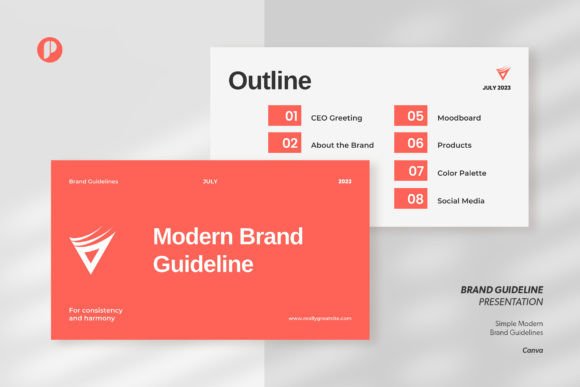
The White Salmon template provides 15 unique designs for presenting brand guidelines in Canva. Its modern, proportional layout is intended to organize brand identity information clearly, with access to the editable template supplied through a PDF link.
- Includes 15 unique presentation designs.
- Provided in Canva format.
- Uses a modern visual direction.
- The layout is described as organized and proportional.
- A PDF file provides the template link.
- Designed around establishing and presenting brand identity.
Consider: The source emphasizes presentation structure rather than documenting a detailed list of specific brand-guideline sections.
4. Brand Guidelines Template Landscape — Best for Multi-Format Brand Documents
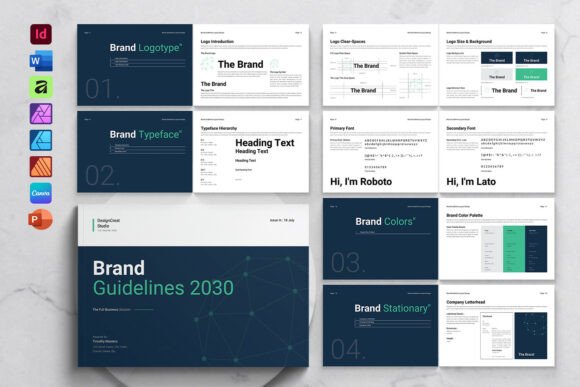
A 24-page landscape template for branding, identity, guidelines, analysis and business-guideline portfolios. It comes in A4 and US Letter sizes and supports customization of images, fonts and colors to align the document with an existing brand system.
- Includes 24 unique pages.
- Suitable for brand identity, brand guidelines and brand analysis.
- A4 and US Letter sizes are documented.
- Images, fonts and colors can be changed.
- The source lists Canva among several supported applications.
- Designed to accommodate brand colors and corporate fonts.
Consider: This is a multi-application template rather than a Canva-only product, which may be useful if your workflow extends beyond Canva.
5. Minimalist Brand Guidelines Presentation — Best for Fashion and Beauty Brands
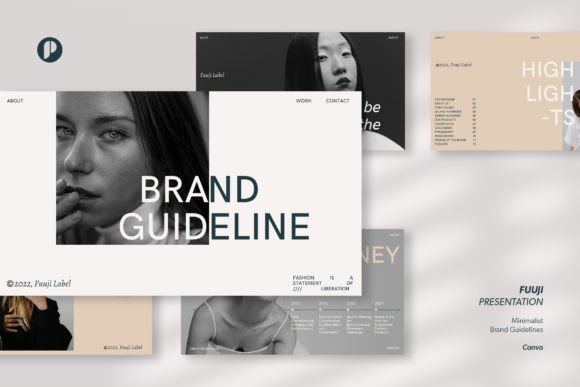
Fuuji uses a white-and-cream minimalist direction with an organized layout intended to keep brand information easy to follow. The source positions it for general brand guidelines while noting that its visual style can be especially effective for fashion and beauty brands.
- Provided in Canva format.
- Uses a white and cream background.
- Built around minimalist styling.
- Features a well-organized layout.
- The source specifically highlights fashion and beauty brands as suitable applications.
Consider: Its restrained aesthetic may be more appropriate for brands seeking a calm, minimal presentation than for identities built around bold or playful graphics.
6. Inkwave Creative Studio Brand Guidelines — Best for Magazine-Style Creative Branding
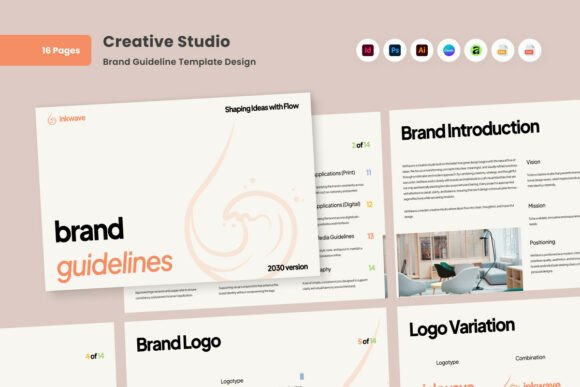
A polished brand-guidelines design centered on image-first layouts, balanced colors and structured typography. Its refined magazine-style visual narrative is aimed at modern businesses, designers and creative teams that want to communicate brand direction clearly.
- Uses image-first layouts.
- Emphasizes calm color balance.
- Features well-structured typography.
- Designed for modern businesses, designers and creative teams.
- The source describes a refined magazine-style visual narrative.
Consider: Images shown in the preview are explicitly stated not to be included in the main file.
7. Brand Guidelines Presentation Canva — Best for Warm Minimalist Branding
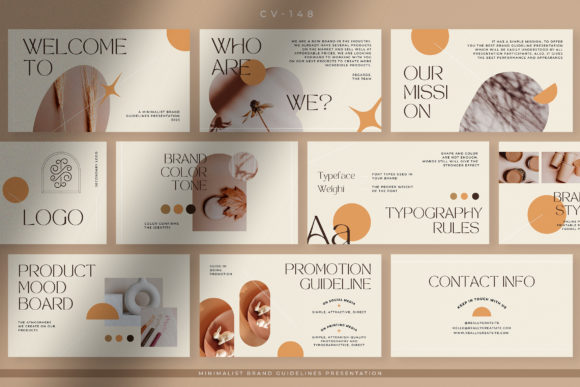
The Warm Earth Minimalist template includes 10 unique Canva designs for presenting brand guidelines. Text, images and colors can be customized, making the layout suitable for adapting a visual identity before sharing it with a team, clients or working partners.
- Includes 10 unique designs.
- Uses a warm-earth minimalist direction.
- Text can be customized.
- Images and colors can also be edited.
- The template link is supplied through a PDF file.
- Intended for presentations to teams, clients and working partners.
Consider: With 10 documented designs, this is a more compact presentation than options in the dataset that provide 15, 21 or 24 designs/pages.
8. Brand Guidelines Presentation Canva — Best for Clean Minimal Business Branding
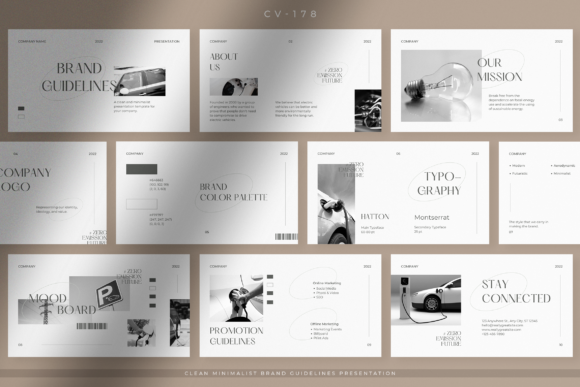
This Broken White template uses 10 unique Canva presentation designs with a clean, minimalist layout. The source positions it for companies, corporate teams, startups, entrepreneurs and other professional businesses that want an organized brand presentation.
- Includes 10 unique presentation designs.
- Uses a Broken White clean and minimalist aesthetic.
- Features an organized, proportional slide layout.
- Designed to focus presentation space on necessary brand information.
- The source identifies corporate, startup and entrepreneurial uses.
Consider: The template is described as Canva-only and has a concise 10-design structure.
9. Brand Guidelines Presentation Canva — Best for Fashion Brand Guidelines
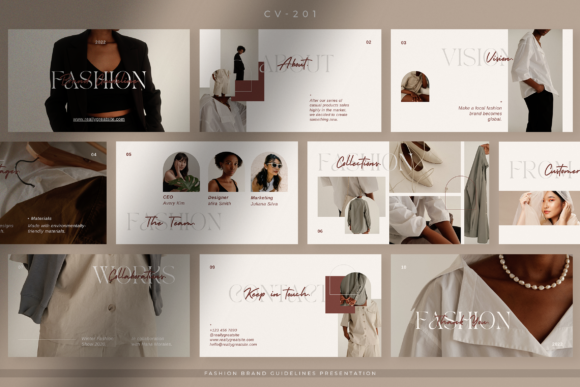
A clean fashion-oriented Canva presentation with 10 unique designs. Its simple, neat layout is intended to keep the main points of a brand presentation prominent without unnecessary space, making it especially relevant to fashion studios and companies.
- Includes 10 unique designs.
- Built specifically around fashion brand guidelines.
- Uses a clean presentation style.
- The layout is described as simple and neat.
- Intended for fashion studios, companies and related business presentations.
Consider: Its fashion-specific positioning makes it a more targeted choice than a neutral brand guidelines design Canva template intended for any industry.
10. Brand Guidelines Presentation Canva — Best for Playful Pastel Branding
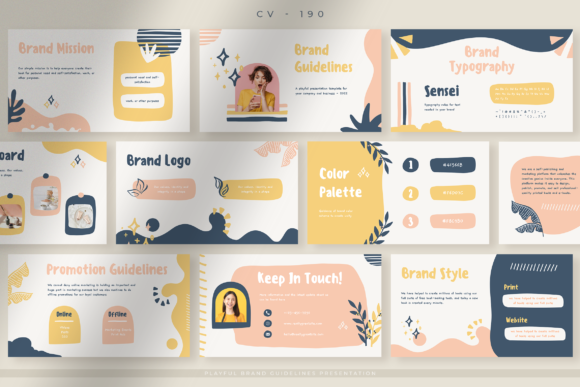
This Pastel Playful template combines 10 unique Canva presentation designs with cheerful pastel styling and an organized layout. The source describes it as suitable for businesses that need a semi-formal presentation while retaining a lively visual character.
- Includes 10 unique presentation designs.
- Uses a pastel color direction.
- Designed to create a cheerful, playful appearance.
- Features a neat, organized layout.
- The source positions it for semi-formal business presentations.
Consider: The playful pastel direction is more distinctive than the neutral minimalist templates, so it is best evaluated against the personality of your existing brand.
11. Eco Digital Brand Guideline — Best for Eco-Conscious Digital Brands
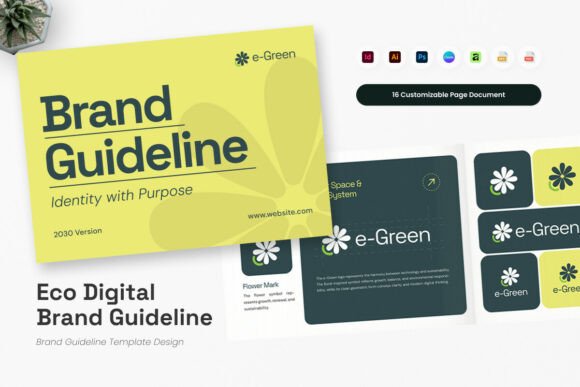
A specialized guideline for startups and digital product teams seeking a consistent brand system across digital platforms, marketing collateral and UI/UX interfaces. Its concept connects environmental values with a clear, technology-oriented visual narrative.
- Designed for startups and digital product teams.
- Addresses consistency across digital platforms.
- The source references marketing collateral and UI/UX interfaces.
- Built around an eco-conscious narrative.
- The listing also references Adobe InDesign compatibility.
Consider: The supplied description is strongly aligned with brand-guideline search intent, but it does not clearly document Canva compatibility. Readers specifically requiring Canva should verify the workflow from the product listing before choosing it.
12. Editable Brand Guidelines Template — Best for a Simple Canva Customization Workflow
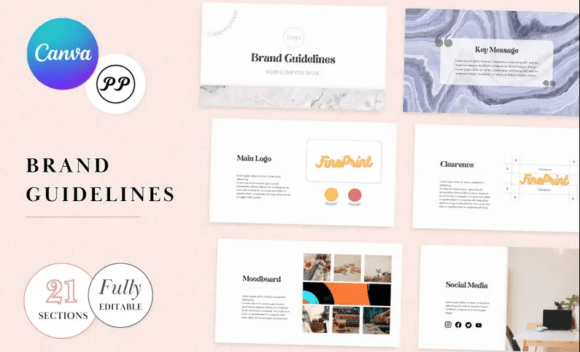
An editable brand-guidelines template supplied through a PDF instruction file that links to the master template. The documented workflow requires saving a copy to your own Canva account before customization begins.
- Designed as an editable brand-guidelines template.
- Uses a PDF instruction file for access.
- The included link directs users to the master template.
- The template must be copied to the user’s Canva account before editing.
Consider: The supplied source gives clear access instructions but very little information about the template’s sections, page count or visual style, so those details should not be assumed.
13. Modern Brand Guidelines Poster — Best for Color-Focused Brand Reference
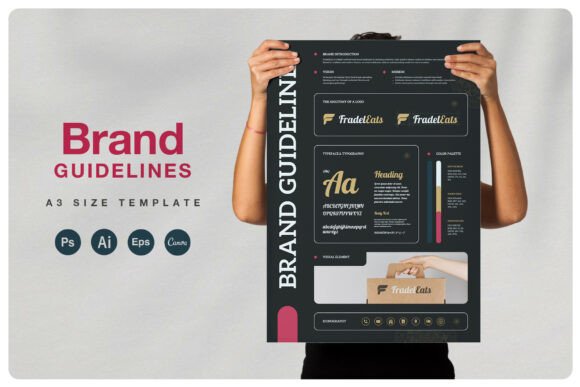
A modern brand-guidelines poster with a documented color-palette customization process. The supplied information is limited, but it identifies simple color editing and an included help file, making it most relevant as a concise visual brand reference.
- Presented as a modern brand-guidelines poster.
- Colors can be changed using the color palette.
- Instructions are provided in an included help file.
- The listing states that preview and mockup images are not included.
Consider: The supplied description does not establish Canva compatibility or provide a detailed content breakdown, so it is a less direct match for readers specifically seeking a full Canva brand-guidelines presentation.
How to Choose a Canva Brand Guidelines Template
The most useful template is one that matches both the information you need to document and the visual language of the brand. A polished layout alone is not enough if it lacks space for the standards your team actually needs to communicate.
Start with the Brand Information You Need to Document
For a more comprehensive guide, prioritize templates that explicitly document relevant sections. In this selection, examples include brand mission, visual identity, tone of voice, logo usage, typography, iconography and color palettes. If you only need a concise presentation, a smaller slide set may be more efficient.
Match the Visual Direction to Your Brand
The brand guidelines design Canva users choose should support the identity rather than compete with it. The supplied options include minimalist white-and-cream layouts, warm-earth styling, playful pastels, fashion-oriented presentations and a magazine-inspired creative approach. Start with the direction closest to the intended brand personality.
Compare Presentation Depth
Documented size varies considerably. Several presentation templates contain 10 unique designs, the White Salmon presentation contains 15, Lune Skin includes 21 slides and the landscape template lists 24 pages. A larger template can provide more room for detailed standards, while a compact set may suit a shorter client presentation.
Check Canva Compatibility and Editing Requirements
Several products are explicitly described as Canva templates, and some specify that the free version of Canva can be used. Others support multiple applications. A few listings in the supplied dataset do not clearly establish Canva compatibility, so readers whose workflow must stay entirely inside Canva should confirm that requirement before selecting those options.
Think About How the Guidelines Will Be Shared
A presentation for a client may benefit from visually focused slides, while an internal brand reference may need more detailed usage instructions. If the document will also be printed, dimensions become relevant; for example, the landscape template explicitly provides A4 and US Letter sizes.
How to Use Canva Brand Guidelines Effectively
- Define the brand’s core identity before customizing the visual presentation.
- Choose only the template sections that serve a clear purpose for your team, client or audience.
- Replace placeholder colors, fonts, imagery and examples with the actual approved brand assets where the template supports those edits.
- Document logo, typography and color rules clearly enough that another person can apply them consistently.
- Include verbal-brand information such as tone of voice when it is part of your identity system.
- Review the finished guide for consistency before distributing it to collaborators or clients.
The template provides the structure, but your own brand decisions determine the substance of the final document. Avoid retaining example content simply because it looks polished. The finished guide should accurately represent the colors, typography, messaging and usage standards that belong to the actual brand.
Practical Comparison and Decision Workflow
If content depth is the priority, start with Lune Skin and the Branding Guideline Template | Brand Book. Lune Skin documents 21 slides and specific visual-identity topics, while the Brand Book explicitly includes mission, visual identity, tone of voice and usage guidelines. The 24-page landscape template is another option when you need a larger document and multiple supported applications.
For presentation-led projects, compare the visual direction first. Fuuji offers white-and-cream minimalism, Warm Earth uses a warmer restrained style, the Broken White template targets clean professional presentations, and the Pastel Playful design takes a more cheerful semi-formal approach. The fashion template is more specifically aligned with fashion-focused branding.
Creative studios may find Inkwave’s image-first, magazine-style direction relevant, while the Eco Digital guideline is positioned around digital teams and an environmental narrative. If Canva compatibility is essential, give priority to products whose supplied descriptions explicitly identify Canva rather than assuming every brand-guideline product in the dataset uses the same workflow.
Frequently Asked Questions
What should Canva Brand Guidelines include?
The exact contents depend on the brand, but useful areas can include visual identity, logo usage, color palettes, typography, iconography, brand mission, tone of voice and usage rules. Several templates in this roundup explicitly document some or all of these areas.
Can I create brand guidelines in Canva?
Yes. Multiple products in this selection are explicitly provided in Canva format, including presentation-style guidelines and editable brand books. Some listings provide access through a PDF containing the Canva template link.
Can I use a free Canva account with these templates?
It depends on the product. Lune Skin explicitly states that everything can be edited with a free Canva account, and the Branding Guideline Template | Brand Book also states that its templates function with the free version. The supplied descriptions do not establish the same requirement for every product.
How many pages should a brand guidelines template have?
There is no single required length. In this dataset, documented templates range from 10-design presentations to a 24-page landscape document. A concise guide can work for a focused identity, while a more detailed brand system may benefit from additional space for visual and verbal standards.
Which style of brand guidelines template should I choose?
Choose a visual direction that complements the identity you are documenting. Minimalist templates may suit restrained professional brands, while pastel or magazine-style layouts can support more expressive identities. Industry fit also matters: some products here are specifically positioned for fashion, beauty, creative studios or digital teams.
What is the difference between a brand guidelines template and a brand presentation?
A detailed guideline can document rules for applying an identity, while a presentation may focus more heavily on communicating the identity visually to clients, teams or partners. The products here overlap, but their descriptions show different levels of emphasis on structured guidelines versus presentation design.
Final Thoughts
The most suitable Canva Brand Guidelines template depends on how much detail you need and how the finished identity should be presented. Lune Skin provides a documented 21-slide structure with several core visual-brand elements, while the Brand Book includes strategic areas such as mission, tone of voice and usage guidelines. The landscape option offers 24 pages and broader application support.
For a more style-led presentation, the minimalist, fashion, pastel and magazine-inspired templates provide distinct visual directions. Start with the information your guidelines must communicate, then choose the layout whose structure and documented editing workflow fit how your team or clients will actually use the finished brand guide.